Posts

Custom PC Building(components choosing guides for new builders)
Image
In my last post, I wrote some tips for gaming PC buying. But I didn't write anything very specific about choosing the right components. That's because writing an in-depth components guide would've made the post too long and you'd feel like you're reading an encyclopedia, not a blog. So in this post, I'll try to cover as much as I can while keeping it as short as possible(but I know it will end up being longest post on my blog 😂).  Custom PC vs Pre-builds : what to choose?  If you don't trust yourself, not even 1% that you can build a PC yourself then buy a pre-build PC. But do remember, the price difference between a pre-build and a custom build could be ₹5000-30,000 depending on where you buy them from. If you're okay with paying someone that much then go ahead, buy a pre-build for the peace of your mind. But do keep it in mind that the price gap is enough to get you slightly more powerful PC. So, let's begin with components. It doesn't matter ...

Best gaming PC 2020(Guide for Indian gamers)

Image
What is a Gaming PC? Due to recent pandemic, people have found new hobbies or revisiting their old ones and gaming is one of them. It is quite evident that you need a gaming PC for gaming. But what really is a gaming PC? The answer is exactly what you're thinking, "any PC that can play games is a gaming PC". But then you'll be thinking, why do sellers advertise some specific PC as 'gaming PC'? That's because that PC is capable of running all the popular games that you've heard of. So technically a PC can be labelled as a Gaming PC if it can play any game while giving the user a smooth gaming experience. That leads to next question Do I need a gaming PC? Well, the answer depends on you actually. There are different types of gamers.  Some are just casual gamer but loyal to certain games. For example, they only play Minecraft or Counter Strike or Dota or Rocket League, etc.  The other type of casual gamers who don't take gaming too seriously but like ...

How to recover files from Windows that won't start

Image
My Windows got corrupted, how do I recover my important files? Most of you have either heard that question from someone you know or have asked that yourself. The most obvious answer you get from internet is to use a recovery software. And they do work, but most of the free recovery softwares have some restrictions to encourage the sale of their premium version. Like some of them allow certain amount of data(upto 2GB) and some limit the number of files/folders per session. When it comes to important work files like legal documents or digital backups of some other important documents, 1 or 2GB is more than enough. But what about other files that hold sentimental values? Like your photos and video from holidays, get together, family functions, etc. They might be in hundreds of GB. How would you recover them? Well this post answers just that.  Note : I'm considering that your Windows died completely and your only option is to do a fresh install.  Linux is more than just an OS Linu...

Asus brings India's first Zen 2 based gaming laptops

Image
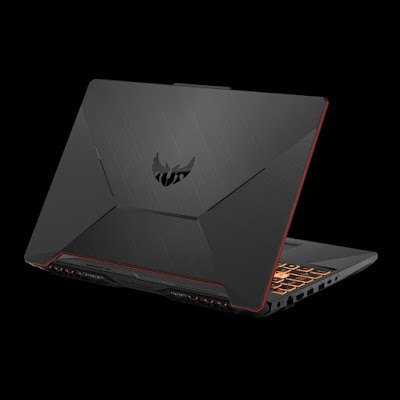
Asus recently announced availability of their budget TUF Gaming series laptops with Zen 2 based Ryzen 4000 series laptop processors. There's no word about online retailers but it is available at some offline authorized sellers.  There would be two models in this lineup, TUF A15 and TUF A17. The numbers represent screen size of the models. I'm still not sure about the exact pricing at the time of writing this post, but their website mentions "starting from ₹60990". Here are the available configurations of both models Asus TUF Gaming A15 Processor Ryzen 9 4900H(8 core 16 thread) Ryzen 7 4800H(8 core 16 thread) Ryzen 5 4600H(6 core 12 thread) RAM 8GB or 16GB DDR4 3200 (upto 32GB dual channel) Display 15.6in 1920x1080p IPS-level(60hz in base model, 144Hz max) Graphics RTX 2060  GTX 1660 Ti  GTX 1650 Ti GTX 1650 Storage 1TB 5400RPM HDD(optional) 256/512/1TB Nvme SSD(dual M.2 SSD slots available with 1660 Ti or higher models) Battery 3-cell 48wh battery li-po Weight 2.3Kg A...

How to recover deleted files from your computer

Image
Hi there, I have permanently deleted some important files by mistake, is there any way to recover it? Other than recommendation questions, this is one of the most frequently asked question I have encountered. So I'll be covering that topic this time. This is not a recovery guide, it's more of a tips and tricks for keeping your important files safe, because as they say, "prevention is better than a cure". But don't worry, I'll also address some methods to recover lost data.  How to keep your data safe? There's no foolproof way of keeping your data safe. So the next best option is: make backups. If the file is important to you, then you should make multiple copies. You can keep the copies on following places. Your internal storage : Cheapest method. Most of us have multiple drives or multiple partitions on a single disk. Keep one copy in each drive. Preferably in zip folders or iso files. So that they're safe from viruses also. Most common viruses don...

How to pick right smartphone

Image
Time get a new smartphone, but which one?  First, I'd like to thank all of you who took some time to read my previous blog and gave some feedback. This time I'll be covering another device that is purchased 3-5 times more than laptop(I don't know the correct statistics but seeing my friends and relatives, they're still using their first or second laptop but they're currently on their 5th or 6th smartphone). This blog can be longer than previous one because buying a smartphone is not as straightforward as buying a laptop. Again I'll try to simplify as much as I can for those of you don't understand the "spec-sheet" of a smartphone. So let's begin. Once again you can use the 3 step methodology I used for laptop shopping but few things here and there would be different.  Step 1: Identifying your needs Keyword is "needs", not workload. Smartphone hardware still follow the workload rule but user requirements are more complex when it comes ...

How to pick right laptop for you

Image
I need a new laptop, but which is the right one? Most of us need to buy a laptop at some point, specially if you're a student or a working professional. And choosing the right one for yourself can be a confusing task if you're not a tech savvy person. Someone like me can simply see the benchmarks and decide if it's worth my money or not. But for some of you, Geekbench, Cinebench, 3Dmark, etc, don't mean a thing. This blog is specially for such people, so you don't have to trust a random person's word. After following these steps, you'll be able to choose yourself. Step 1: Identifying your needs(Workload) You can put this in 3 categories 1. Light - Most basic works like surfing the internet, watching videos, working with documents and spreadsheets.  2. Medium - Usually multitasking and slightly complex softwares. For example: programming, photo editing(not just applying filters, proper editing) and lightweight casual gaming(those infamous Candy C...